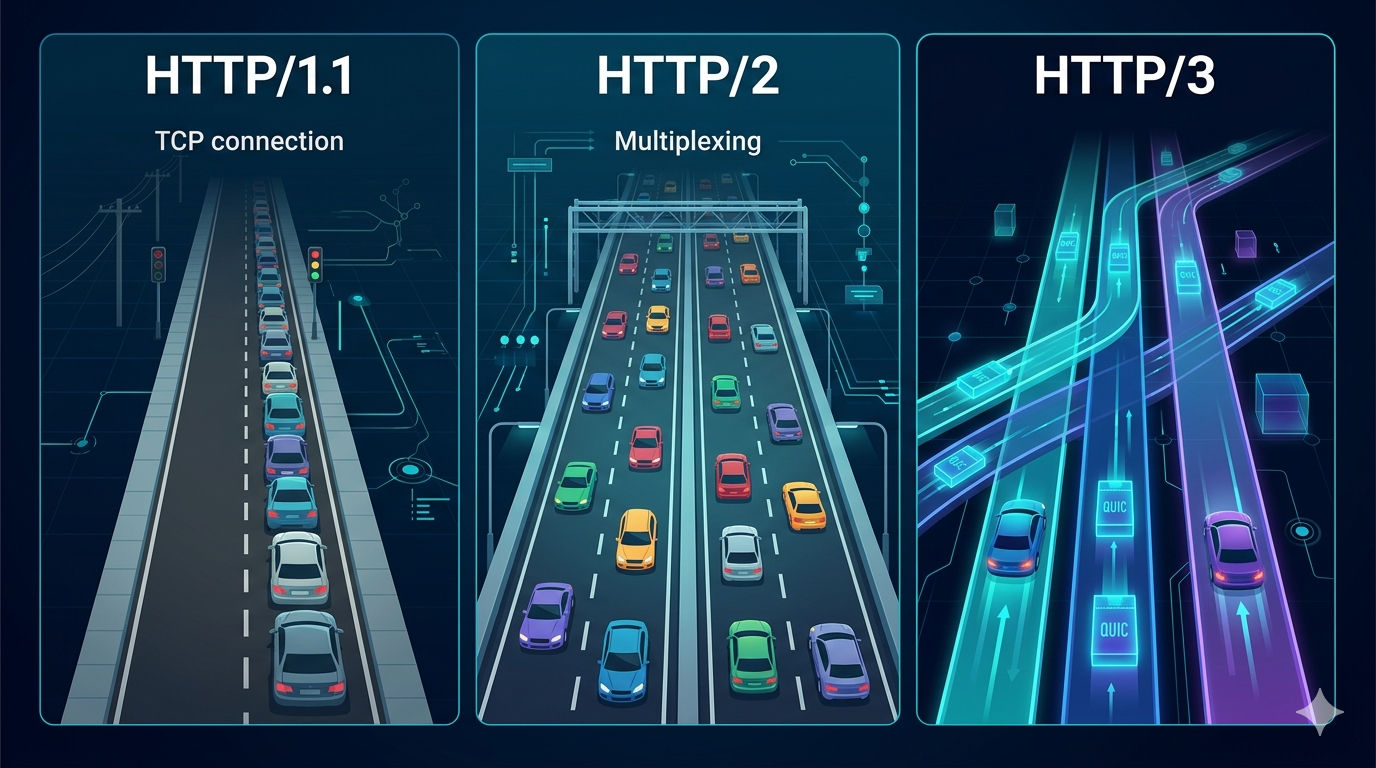
How the backbone of the web went from a simple text protocol to a blazing-fast, multiplexed, encrypted-by-default communication layer.
A Brief History of HTTP
HTTP (HyperText Transfer Protocol) was invented by Tim Berners-Lee in 1989 as a simple mechanism to transfer hypertext documents between a client and a server. The original HTTP/0.9 was a one-liner — literally a single GET command with no headers, no status codes, and no versioning.
HTTP/1.0 followed in 1996, introducing headers, status codes, and support for different content types. But it was HTTP/1.1, standardized in 1997 (and revised in 2014), that became the dominant protocol powering the web for over two decades.
The web, however, evolved dramatically. Pages went from simple text documents to complex applications with hundreds of assets — scripts, stylesheets, fonts, images, API calls. HTTP/1.1 began to show its age, and the industry responded with two major revisions: HTTP/2 (2015) and HTTP/3 (2022).
HTTP/1.1 — The Workhorse of the Early Web
How It Works
HTTP/1.1 is a text-based, request-response protocol that runs over TCP. The client opens a TCP connection, sends a request, and waits for the server’s response before it can send the next one.
Client → [TCP Handshake] → Server
Client → GET /index.html  → Server
         ← 200 OK + HTML  ←
Client → GET /style.css   → Server
         ← 200 OK + CSS   ←
Client → GET /script.js   → Server
         ← 200 OK + JS    ←
Key Features
- Persistent connections —
keep-aliveallows reusing a TCP connection for multiple requests (vs. HTTP/1.0, which closed after each one). - Pipelining — technically allows sending multiple requests without waiting, but it was widely disabled due to Head-of-Line (HOL) blocking: if the first response is slow, all subsequent ones are stuck waiting.
- Chunked transfer encoding — allows streaming responses without knowing the content length upfront.
- Host header — enables virtual hosting (multiple sites on one IP).
The Problems
Despite its longevity, HTTP/1.1 has fundamental limitations:
| Problem | Description |
|---|---|
| Head-of-Line Blocking | One slow response blocks all requests on that connection |
| No multiplexing | Only one request at a time per connection |
| Verbose headers | Repetitive, uncompressed plain-text headers on every request |
| No server push | The server can only respond, never proactively send resources |
| TCP overhead | Each new connection requires a 3-way handshake (and TLS adds even more round-trips) |
The workaround era: Developers invented tricks to compensate — domain sharding (opening connections to multiple subdomains), CSS sprites, JS bundling, and inlining resources. These hacks added complexity and maintenance overhead.
HTTP/2 — The Performance Revolution
HTTP/2 was standardized in May 2015 (RFC 7540), based on Google’s experimental SPDY protocol. It addressed HTTP/1.1’s performance bottlenecks without changing the semantics — methods, status codes, and headers remained the same.
Binary Framing Layer
The most fundamental change: HTTP/2 replaced the human-readable text format with a binary framing layer.
HTTP/1.1 (text):             HTTP/2 (binary):
GET /index.html HTTP/1.1     [HEADERS frame, stream 1]
Host: example.com            [binary encoded]
Accept: text/html
Binary is more efficient to parse, less error-prone, and enables the features below.
Multiplexing
HTTP/2 introduced streams — independent, bidirectional sequences of frames within a single TCP connection. Multiple requests and responses can be interleaved simultaneously.
Single TCP Connection
├── Stream 1: GET /index.html  →  ← 200 HTML
├── Stream 3: GET /style.css   →  ← 200 CSS
├── Stream 5: GET /script.js   →  ← 200 JS
└── Stream 7: GET /logo.png    →  ← 200 PNG
No more waiting. No more domain sharding. One connection, unlimited parallel streams.
Header Compression (HPACK)
HTTP/2 uses HPACK compression for headers. It maintains a dynamic table of previously seen headers — so repeated headers (like User-Agent, Accept-Encoding, Cookie) are sent as small index references instead of full strings.
A typical request that sent ~800 bytes of headers in HTTP/1.1 might send only ~50 bytes in HTTP/2.
Server Push
The server can proactively send resources to the client before they are requested:
Client → GET /index.html → Server
Server ← HTML + PUSH /style.css + PUSH /script.js ←
The idea: when the server knows the HTML will need these assets, it pushes them alongside the response. In practice, server push proved difficult to implement effectively and was largely abandoned by major browsers by 2022.
Stream Prioritization
Clients can assign weights and dependencies to streams, hinting to the server which resources are more important (e.g., render-blocking CSS before below-the-fold images).
The Remaining Problem: TCP Head-of-Line Blocking
HTTP/2 solved application-level HOL blocking, but introduced a subtler variant at the transport layer. Since all streams share one TCP connection, a single lost packet causes TCP to stall the entire connection until the packet is retransmitted — even for streams that don’t need the missing data.
On lossy networks (mobile, Wi-Fi), HTTP/2 can actually perform worse than HTTP/1.1 (which spreads risk across multiple TCP connections).
HTTP/3 — The QUIC Future
HTTP/3 was standardized in June 2022 (RFC 9114). It makes the most radical change yet: replacing TCP with QUIC — a new transport protocol built on top of UDP.
What is QUIC?
QUIC (Quick UDP Internet Connections) was developed by Google around 2012 and later standardized by the IETF. It reimagines the transport layer from scratch:
- Built on UDP instead of TCP
- Multiplexing without HOL blocking — each stream is independent; a lost packet only affects its own stream
- Built-in TLS 1.3 — encryption is not optional; it’s part of the protocol
- 0-RTT and 1-RTT connection establishment — dramatically reduces handshake latency
- Connection migration — connections survive IP address changes (e.g., switching from Wi-Fi to mobile data)
Connection Establishment: The Latency Win
HTTP/1.1 over TLS 1.2:
TCP SYN → SYN-ACK → ACK          (1.5 RTT)
TLS Hello → Certificate → ...     (2 RTT)
Total: ~3.5 RTT before first byte

HTTP/2 over TLS 1.3:
TCP + TLS combined                 (~1.5–2 RTT)

HTTP/3 (QUIC + TLS 1.3):
Initial QUIC handshake             (1 RTT)
Subsequent connections             (0 RTT — cached session)
For a user in a region with 100ms latency to the server, this is the difference between 350ms and 100ms before a single byte of content arrives.
True Stream Independence
In HTTP/3, each QUIC stream is truly independent at the transport level. A lost UDP packet only blocks the stream it belongs to:
HTTP/2 (TCP):                    HTTP/3 (QUIC):
Lost packet → ALL streams stall  Lost packet → only Stream 3 pauses
                                 Streams 1, 5, 7 continue unaffected
This is the key advantage on unreliable networks.
Connection Migration
QUIC identifies connections using a Connection ID, not the 4-tuple (src IP, src port, dst IP, dst port) that TCP uses. This means:
- Switching from Wi-Fi to 4G doesn’t break your connection
- Load balancers can route packets to different servers seamlessly
- Critical for mobile users constantly moving between networks
Adoption and Challenges
HTTP/3 adoption has grown rapidly. As of 2024, over 30% of websites support HTTP/3, including Google, Facebook, Cloudflare, and most major CDNs.
Challenges remain:
- UDP is sometimes blocked by enterprise firewalls and middleboxes
- CPU overhead — QUIC encryption in user-space is more CPU-intensive than kernel-level TCP
- Debugging is harder — binary encrypted UDP packets vs. familiar TCP streams
Side-by-Side Comparison
| Feature | HTTP/1.1 | HTTP/2 | HTTP/3 |
|---|---|---|---|
| Year standardized | 1997 | 2015 | 2022 |
| Transport protocol | TCP | TCP | QUIC (UDP) |
| Format | Text | Binary | Binary |
| Multiplexing | ❌ (one req/conn) | ✅ (streams) | ✅ (independent streams) |
| HOL blocking | ❌ App + TCP level | ⚠️ TCP level only | ✅ Eliminated |
| Header compression | ❌ None | ✅ HPACK | ✅ QPACK |
| Server push | ❌ | ✅ (deprecated) | ✅ (rarely used) |
| TLS required | ❌ Optional | ⚠️ Optional (browsers require it) | ✅ Mandatory |
| Connection setup | ~3 RTT | ~2 RTT | 1 RTT (0-RTT resumption) |
| Connection migration | ❌ | ❌ | ✅ |
| Performance on packet loss | Moderate | Degrades | Resilient |
| Adoption (2024) | Universal | ~65% of sites | ~30%+ of sites |
Which Version Should You Use?
Use HTTP/3 if:
- You operate a high-traffic public service (news, e-commerce, SaaS)
- Your users are frequently on mobile or unreliable connections
- You use a CDN (Cloudflare, Fastly, AWS CloudFront — they handle HTTP/3 for you)
- Latency is a competitive advantage for your product
Use HTTP/2 if:
- HTTP/3 is not supported by your infrastructure yet
- You’re behind a corporate firewall that blocks UDP
- Your server-to-server communication is on a reliable datacenter network (where TCP HOL blocking is less impactful)
Still on HTTP/1.1?
- Consider migrating — HTTP/2 is a drop-in improvement with no semantic changes required
- Most modern web servers (nginx, Apache, Caddy, Node.js) support HTTP/2 with a configuration flag
Practical tip: If you’re using a CDN, you likely get HTTP/2 and HTTP/3 automatically between users and the edge. Focus your effort on optimizing the origin→edge connection, which is often overlooked.
Conclusion
The evolution from HTTP/1.1 to HTTP/3 reflects two decades of learning about how the web actually works at scale:
- HTTP/1.1 gave us a stable, universal foundation — but its sequential, text-based nature became a bottleneck.
- HTTP/2 solved the application-layer performance problems with multiplexing and binary framing — but remained limited by TCP’s transport-layer constraints.
- HTTP/3 rethinks the transport layer itself, eliminating HOL blocking at its root and making fast, resilient connections a first-class concern.
The web’s protocol stack is not static — it evolves in response to how people actually use the internet. And with HTTP/3 adoption accelerating, the next bottleneck is already being identified: the application logic and architecture sitting above the protocol layer.
The protocol is fast. Now it’s up to us to build applications worthy of it.